

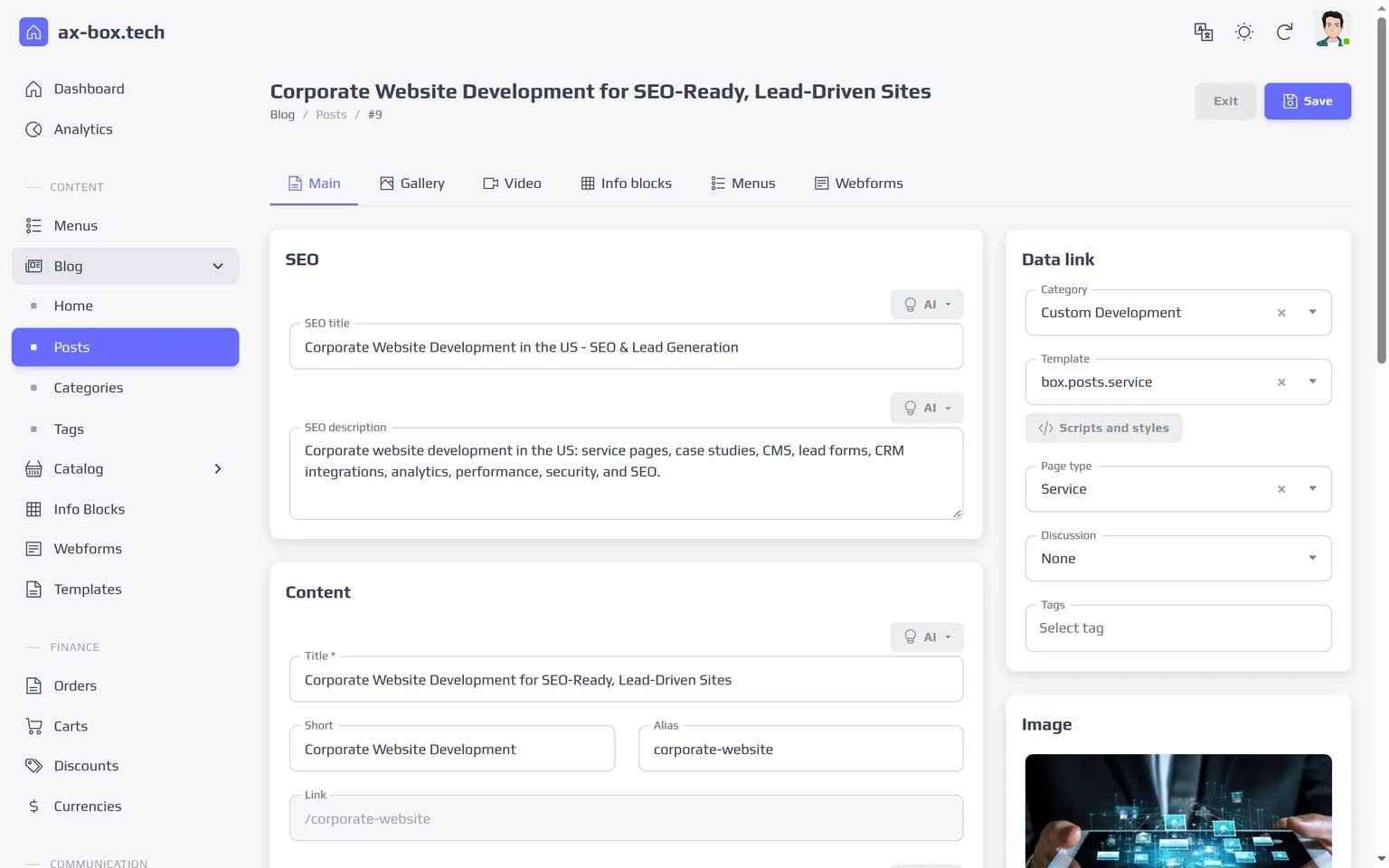
AX-BOX CMS is a content management system for business websites, written in Go. The site and the work around it live in one admin panel: pages and content, forms and leads, company mailboxes, built-in analytics and AI. There is no need to assemble them from a dozen separate services and plugins, and the system runs on your own server rather than in someone else's cloud. It is the first product of AX-BOX Platform, our own modular software platform.
- Built for: company websites, information portals and content-heavy sites that need to be fast and to rank well in search. For a product catalog or an online store, see AX-BOX Commerce.
- Editions: Single-Language for one market and Multilingual for several languages and markets.
- Delivery: self-hosted on your server, a perpetual license per production site.
- In production: our own site runs on AX-BOX, and the WoodHomes catalog and back office run on the same platform.
AX-BOX CMS at a Glance
- One admin panel for the site and the work around it: content, templates, blocks, menus, forms, leads, mailboxes, analytics and AI.
- Comments and reviews with moderation: visitors discuss and rate, staff publish and answer.
- Your team gets help in the panel: a user manual and an AI assistant that answers from it and links to the right sections.
- Your server, your data: self-hosted on Docker, built-in analytics without third-party counters.
- AI built in: OpenAI, Anthropic, Google Gemini, xAI, DeepSeek and YandexGPT, with an AI button next to editor fields, a chat assistant for visitors and an assistant for staff.
- Fast under load: every page is rendered on the server on request, with no full-page cache; a complex content page handles 4,750 requests per second at 50 concurrent requests, p99 20 ms (conditions below).
- Lighthouse 100 / 100 / 100 / 100 on desktop on a production site built on the same platform.
Your Team Runs the Site
A new block on the home page, a changed footer, a tracking code or a redirect should not wait for a developer. In AX-BOX CMS these are settings in the admin panel. Editors write content in a visual editor, and templates are edited by someone on the team who knows HTML. Together they handle everything a website needs day to day:
- create and publish pages, posts, categories and tags, schedule publication and archive old content; an archived record leaves the site but can be restored with all its links for 30 days;
- upload photos, galleries and videos; images are converted to light versions automatically;
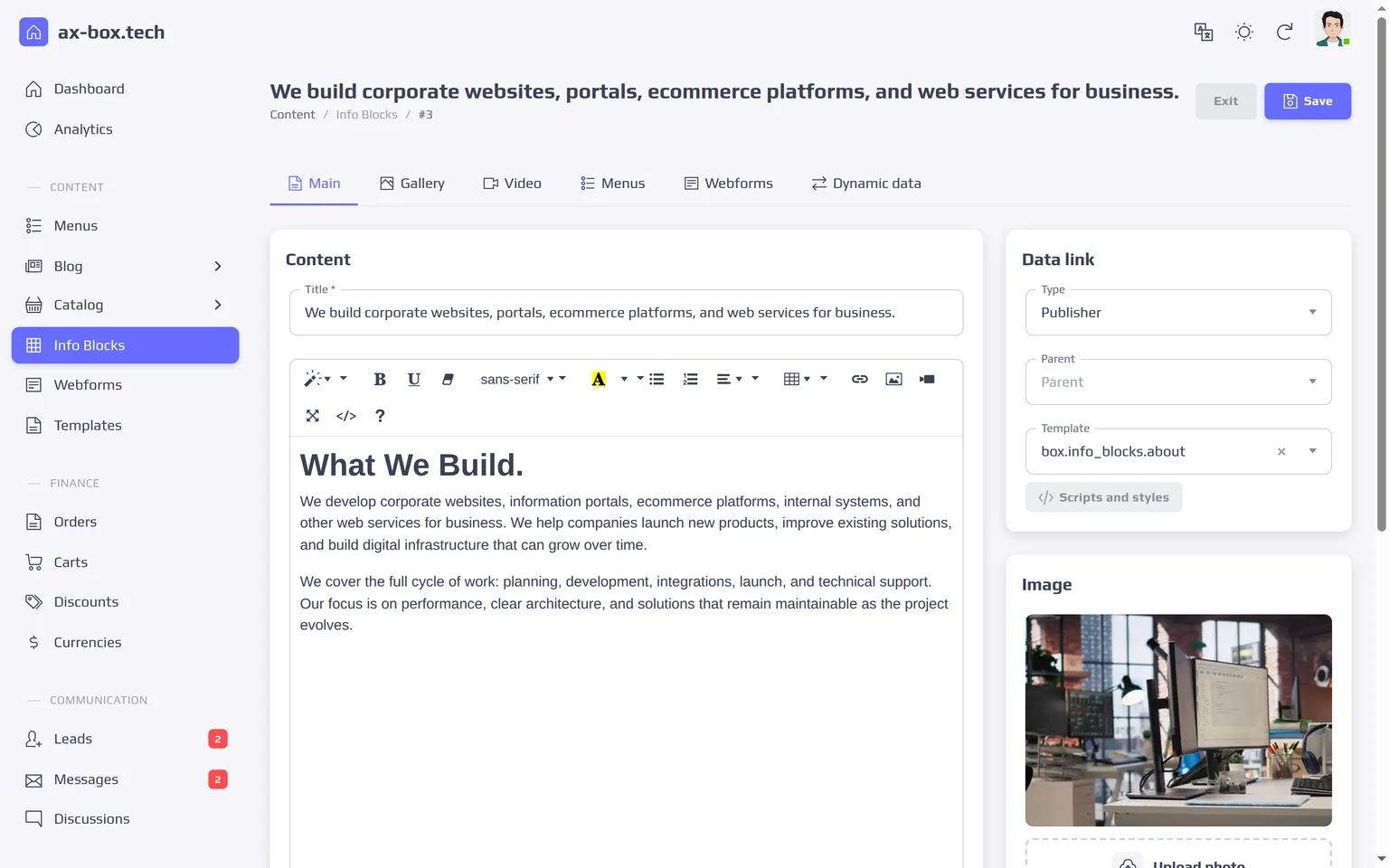
- build menus, the header and the footer from reusable information blocks;
- attach galleries, information blocks and forms to any page, at the top, bottom or side;
- edit page templates in the browser and choose a template for each page, block, gallery or menu;
- build forms with fields of every type and route submissions to leads and email;
- add redirects, verification keys and tracking scripts;
- connect company mailboxes and AI model providers;
- manage users, roles and access rights;
- moderate comments and reviews and reply on behalf of the company;
- switch features on and off, from comments and favorites to the AI chat.
The admin panel itself speaks English and Russian: each user switches the language in the header. Every change takes effect on the site immediately, without a release or a restart. A developer is needed for custom integrations, new modules and significant changes to the design or logic of the site, and our team can take that work on.
User Manual and AI Assistant in the Admin Panel
The admin panel has a Documentation section: a plain-language manual in English and Russian. It walks through writing posts, adding photos and galleries, building menus and information blocks, working with files, handling leads and email, and setting up users and roles. The table of contents leads to the right section, and buttons and fields are named exactly as staff see them on screen.
When it is not clear how to do something, staff can ask the AI assistant right in the Documentation section. Ask "How do I add photos to a gallery?" and the assistant answers step by step from the manual, with links to its sections. New team members learn where they work, without waiting for a developer to reply.
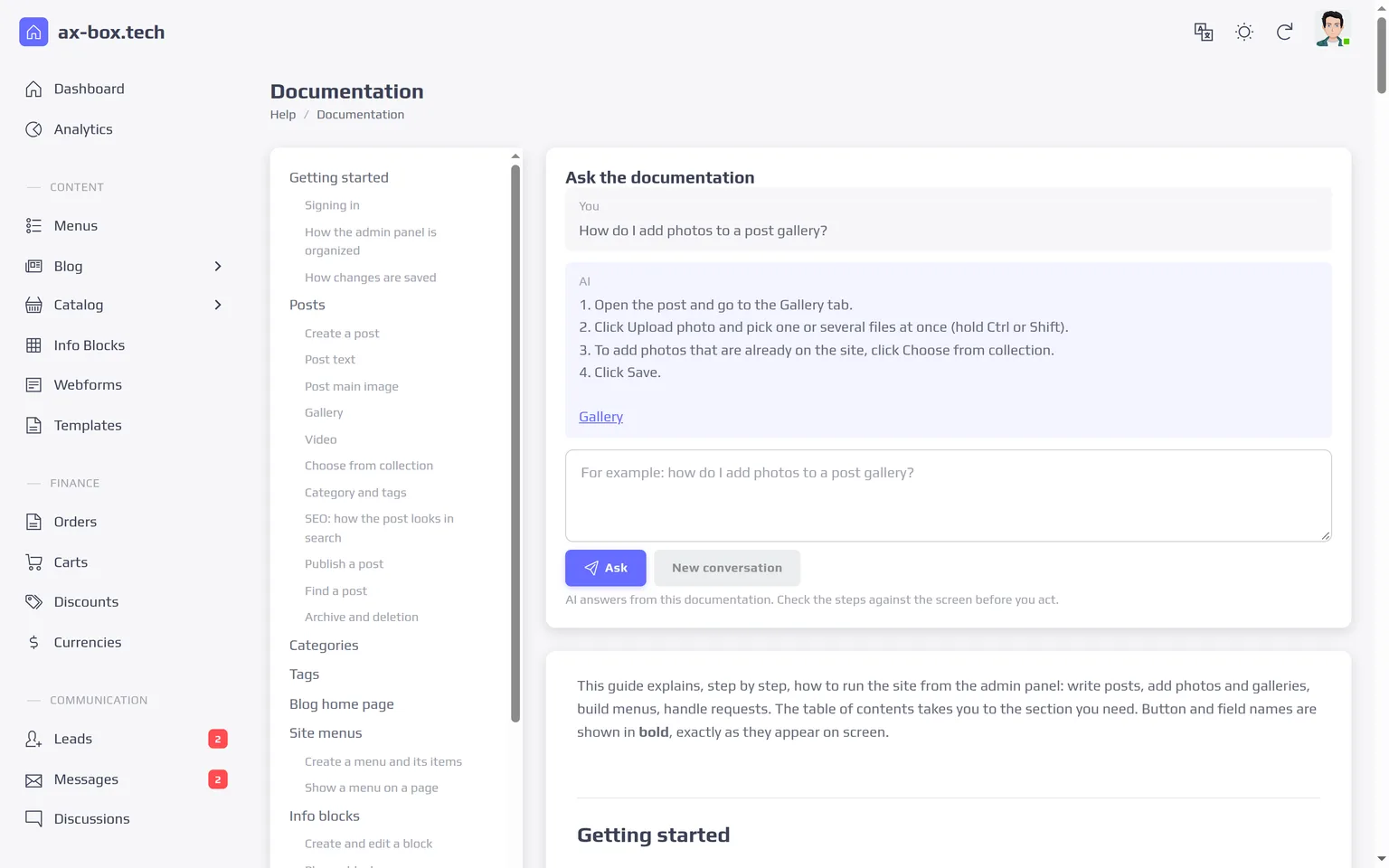
The assistant runs on a model connected in the AI module, is available to staff with the AI permission, and its usage counts toward the shared limits.
Templates and Blocks You Edit in the Browser
The look of the site lives in server-side HTML templates that the admin panel opens in an editor. A template can be copied, edited and attached to a page, a category, an information block, a gallery or a menu. Templates shipped with the theme are protected: saving one creates an editable copy, so the original is always there to go back to.
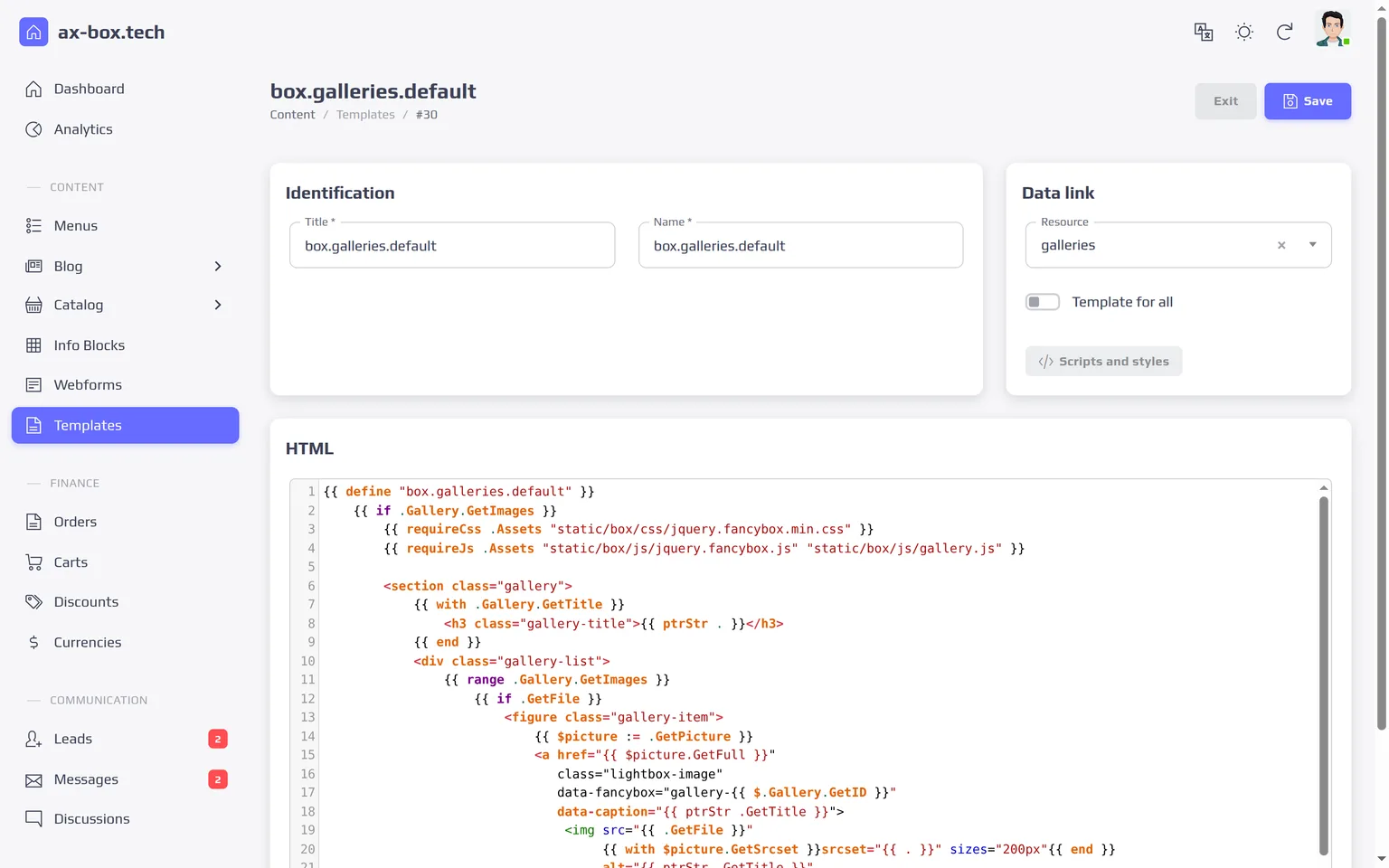
The header and the footer are information blocks too. Their styles and scripts are declared in the templates themselves, so the admin panel shows exactly what each page loads. When a change would break the page, for example a header without the core script, the system saves it and warns the editor instead of failing silently.
AI in the Editor, on the Site and in the Admin Panel
Language models are a module of the platform, not a separate tool to copy text into and out of. An administrator connects providers and models in the admin panel, and three features use them.
Working with Content
Editor fields where it helps get an AI button: write a meta description, improve a text, translate a field. Administrators add their own actions with their own instructions and choose a model for each.
Chat Assistant for Visitors
Answers visitors from the site's own content, which is indexed and refreshed from the sitemap. When the answer is not on the site, it says so and offers to pass the question to a manager: the visitor leaves contacts, and the request arrives in the leads with the whole conversation. Staff see every dialog in the admin panel.
Assistant for Staff
Answers questions about working in the admin panel from the user manual and links to its sections; see the section on the manual above.
Providers and Control
- Providers: OpenAI, Anthropic, Google Gemini, xAI, DeepSeek, YandexGPT and any OpenAI-compatible API. A model is added by its provider ID, so new models need no update.
- Control: API keys are stored encrypted and never shown in the panel, every call is logged with tokens and response time, and limits cap usage per visitor, per action and per day.
Forms, Leads and Built-in Analytics
- Forms: fields of every type, groups, required fields and success messages are set up in the admin panel; a form can be attached to any page or block.
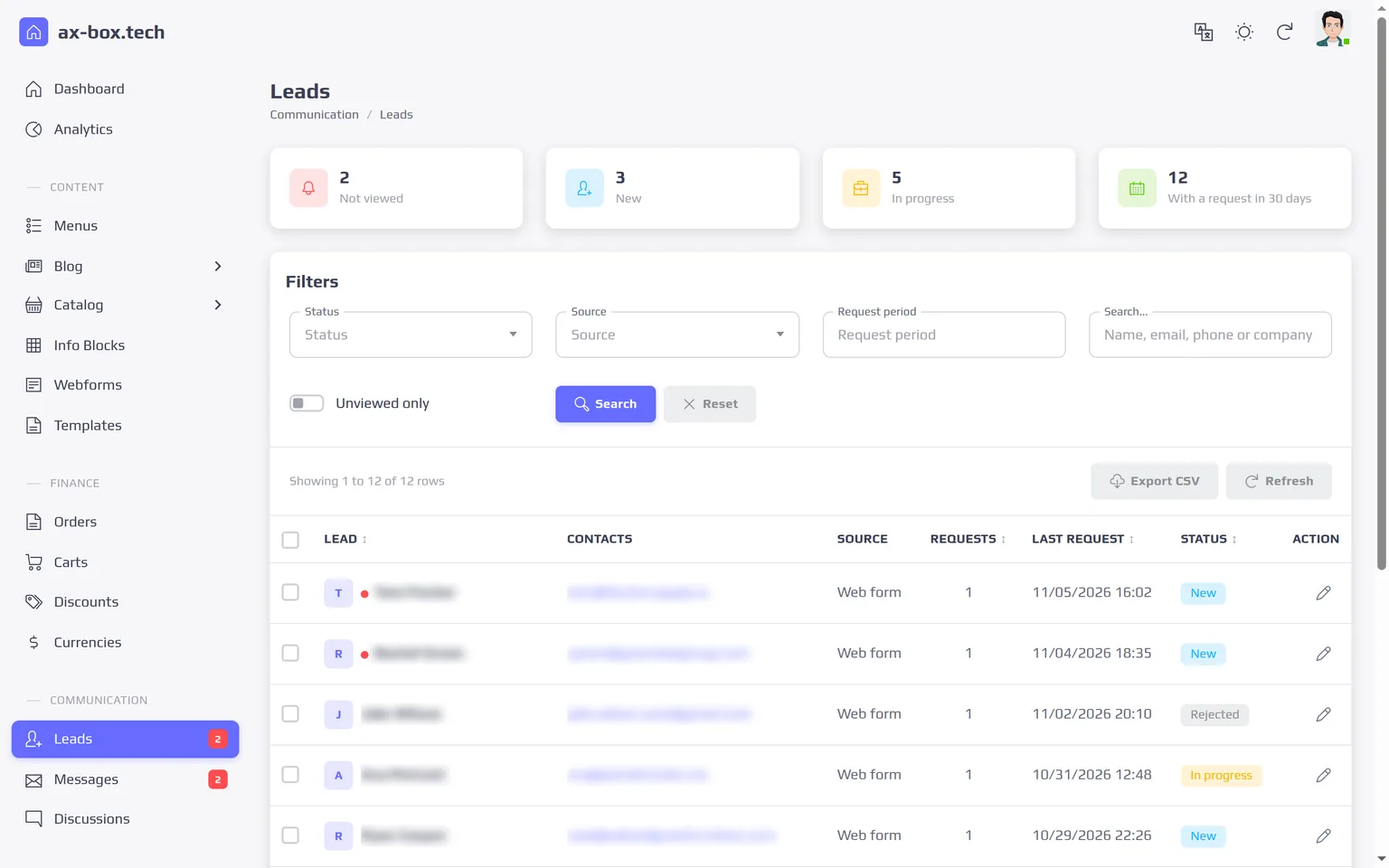
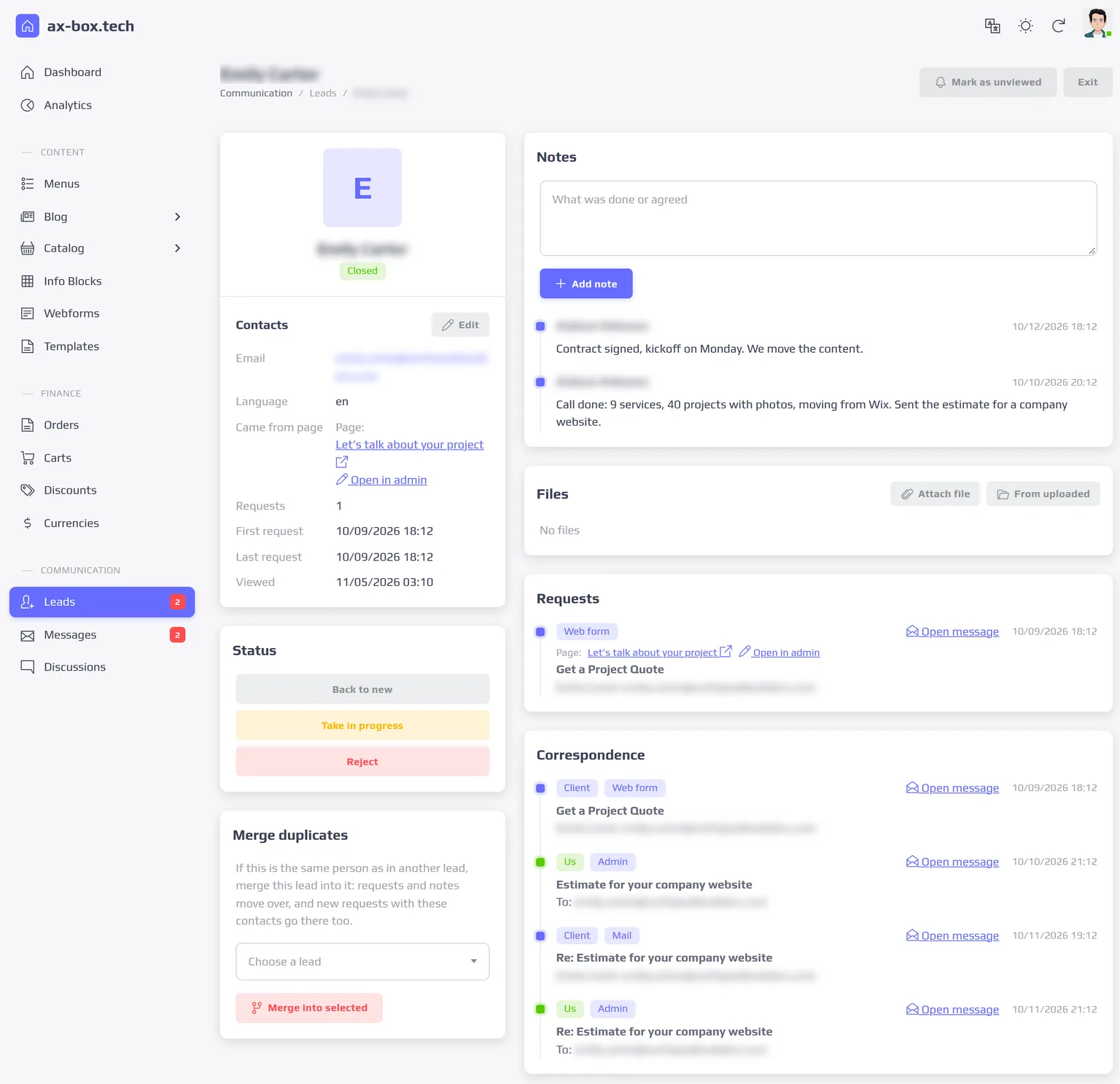
- Leads: every form submission and every request from the chat becomes a request attached to a lead; a letter from a company mailbox turns into one with a button. Repeat contacts are matched by email or phone; leads have statuses, notes, duplicate merging and CSV export.
- Private documents: contracts, scans and invoices are attached to leads and letters and kept in a private store: they never get a public address and open only from the admin panel.
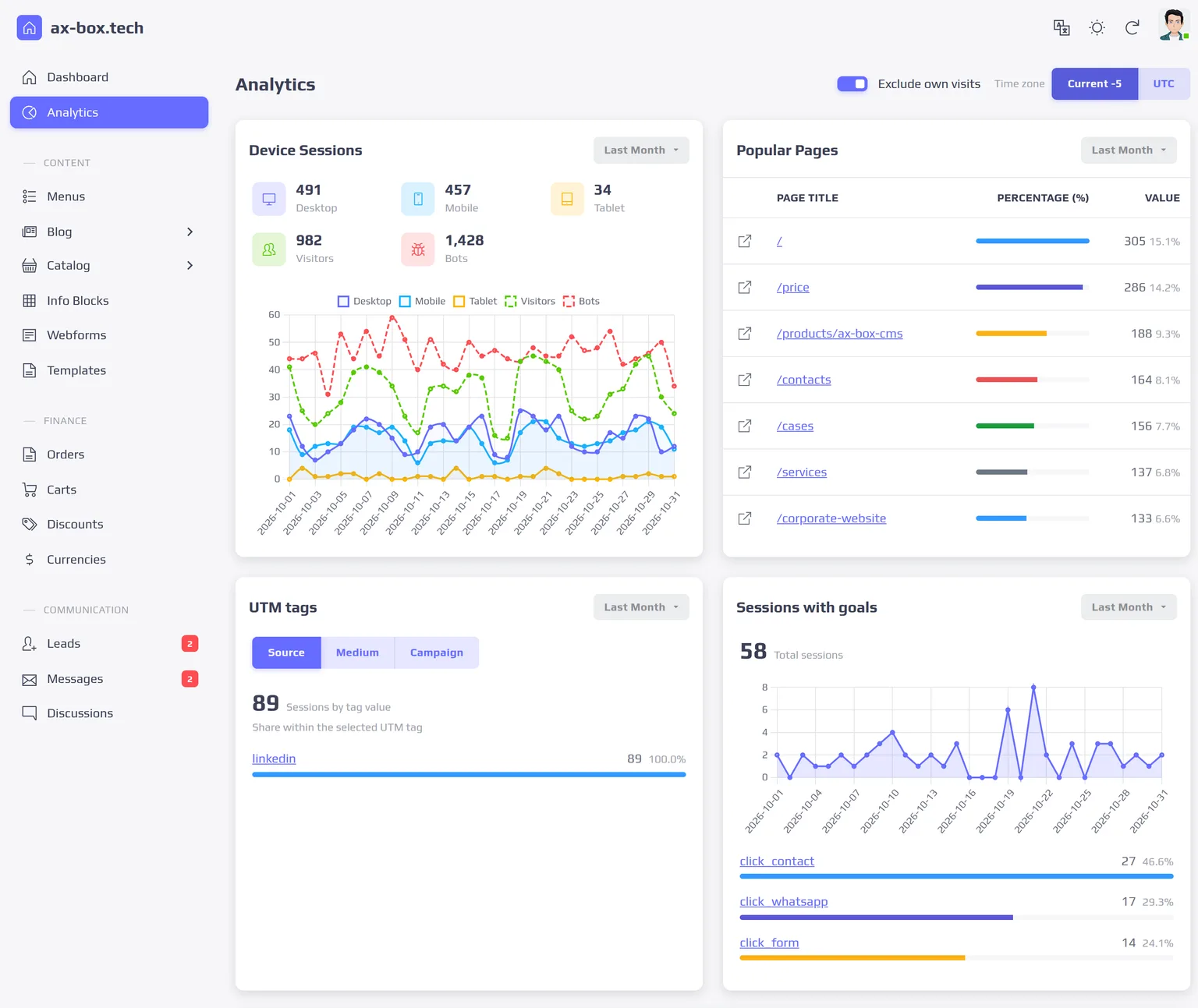
- Analytics: sessions, devices, top pages, traffic sources with UTM tags and goals such as phone, messenger and form clicks. Bots are filtered out, staff visits can be excluded, and the location database runs locally, so no visitor IP goes to an outside service.
- Privacy: the site can collect statistics only after cookie consent and erase IP addresses after a period you set; both are switched on in the configuration.
- Integrations: Google Analytics 4, Google Tag Manager, Meta Pixel and Yandex Metrica are added in the admin panel, each with its own consent setting.
Comments and Reviews
Each page chooses its discussion: none, comments or reviews. Everything visitors write waits for moderation and appears on the site only after a moderator publishes it.
- Comments: signed-in visitors and guests write, and replies form threads.
- Reviews: signed-in visitors only, one review per page, a rating from one to five stars and photos; the company answers with an official reply.
- Moderation: publish, reject, mark as spam or delete; a visitor's words cannot be edited by staff.
Connect Any Mailbox
AX-BOX CMS works with the mail you already have. An administrator adds a mailbox with its server settings; the system sends over SMTP with TLS and synchronizes the inbox and sent folders over IMAP. Letters sit in the admin panel next to the leads they belong to. Mailbox passwords are stored encrypted with a key ring that supports rotation, and spam and blocked senders are handled in the same place. Any provider with SMTP and IMAP works.
Single-Language or Multilingual
AX-BOX CMS comes in two editions of one product. They share the admin panel, the modules and the architecture; the difference is how content is stored.
| Single-Language | Multilingual | |
|---|---|---|
| Languages | One site language | Any number, from a configurable list |
| URLs | One address per page | An address per language, linked with hreflang |
| SEO fields | Per page | Per page and per language |
| AI | Writing, editing and translating fields | The same, plus help with translating content into each language |
| Best for | One market | Several languages and markets |
Choose the edition before launch: moving a working single-language site to Multilingual is a content migration, which we carry out as a project. See the Multilingual edition for details.
From One Server to Distributed Infrastructure
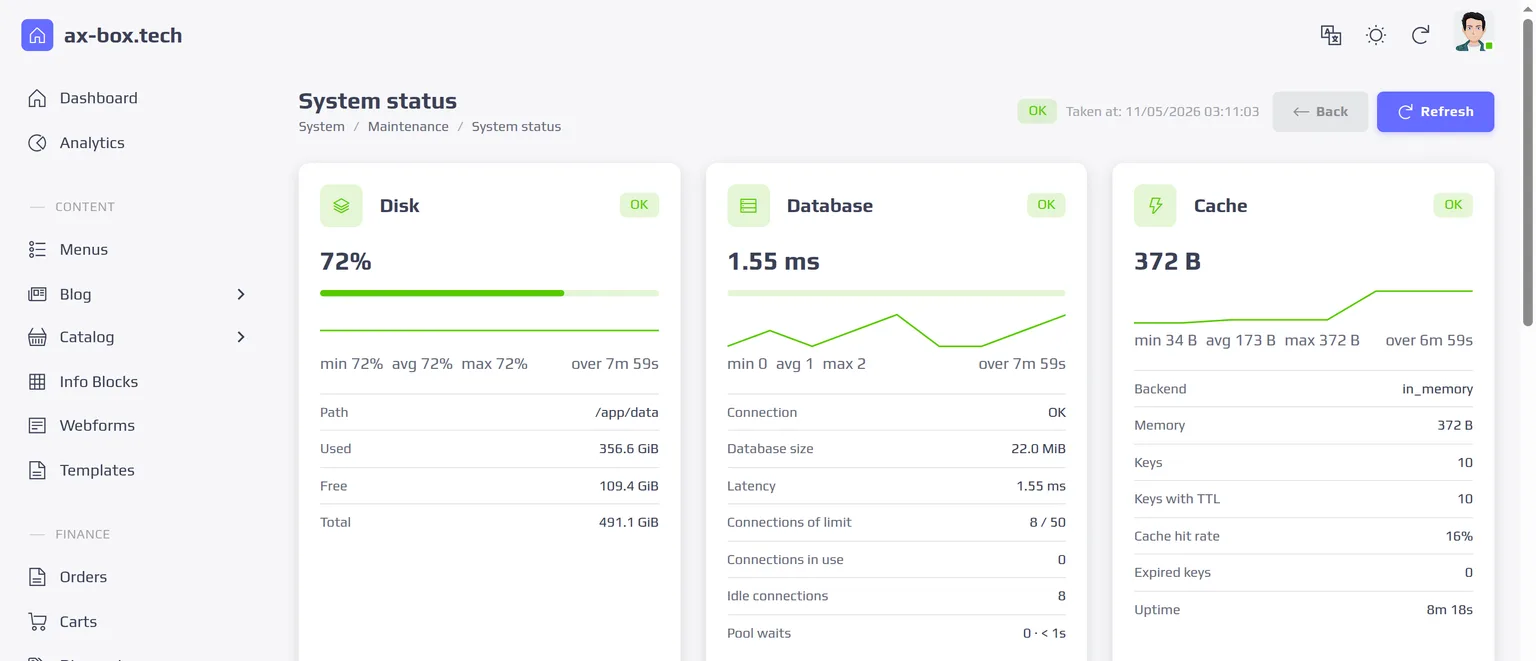
AX-BOX CMS does not need complex infrastructure to launch. A typical project runs on one server: the application, PostgreSQL and Redis in Docker containers, on your own hardware or in the cloud. Inside it is a modular monolith: one application with modules, contracts between them, an event bus and background queues. A company website does not have to deploy and wire together a dozen separate services.
As the project grows, the infrastructure can grow with it: give the server more resources, move the database and Redis to their own nodes, put a load balancer and a CDN in front of the site. Sessions and the shared cache live in Redis, so this path is built into the architecture. For projects with higher load and availability requirements we can prepare a Kubernetes deployment with several application instances and shared file storage.
Start with a simple installation and add infrastructure only when you really need it, without changing the system.
Deployment and License
AX-BOX CMS runs on your own server or cloud account: one compiled application with PostgreSQL and Redis, packaged for Docker. It works behind a reverse proxy or on its own, with built-in HTTPS and automatic Let's Encrypt certificates.
- License: perpetual, per production site; the core is delivered as a compiled build.
- Updates and support: by annual subscription.
- Source code: with a ready-made license, the source code of the core is available under a separate Enterprise agreement. In a custom project we build on the core, you receive a perpetual license to the core together with its source code, and all code written for the project is yours.
- AI: models are connected with your company's own API keys, and the provider bills usage to your account.
- Services: installation, theme design, content migration, integrations and custom modules by our team; see Services.
Technical SEO Out of the Box
The technical side of search optimization is built in, so a new site does not start with a list of SEO tasks for a developer:
- meta title and description edited next to the content of every page;
- clean URLs and canonical addresses;
- an XML sitemap that is updated as content is published;
- structured data in JSON-LD: organization, website, breadcrumbs and articles;
- Open Graph tags for links shared in social networks and messengers;
- a redirect manager with 301, 302, 307 and 308 codes that refuses duplicates and redirect loops;
- verification keys for Google Search Console, Bing, Yandex and Meta without touching templates.
Lighthouse scores depend on the theme, content and hosting. On the WoodHomes site, built on the same platform, the score is 100 in all four categories on desktop and 96-98 for Performance in mobile emulation.
Built for Speed: Every Page Rendered Live
Many systems look fast because they serve a cached copy of the whole page and fall back to slow rendering when the cache misses. AX-BOX CMS has no full-page cache. Each request is rendered on the server in Go and sent as finished HTML. Only reusable fragments are cached: the header and the footer, menus, galleries, information blocks and forms. Saving a fragment in the admin panel refreshes it everywhere at once, so visitors never see stale content.
- server-side rendering with no client-side framework to load before the content appears;
- PostgreSQL as the source of truth, with query budgets checked by automated tests;
- in-memory, Redis or hybrid caching for fragments, switched by configuration;
- images converted to WebP in several sizes by libvips in a separate process;
- bundled and minified styles and scripts with long-lived cache headers, Brotli compression;
- background queues for email, AI index rebuilds and other slow work.
Load Test Numbers and What They Mean
We measure the platform on every significant change with the same set of heavy pages. The content page below carries a long text, a 40-image gallery, a 60-field form and three information blocks. The numbers come from our load-test bench, not from a small demo site; catalog and product pages are measured on the AX-BOX Commerce page.
| Page | 1 request at a time | 50 concurrent requests |
|---|---|---|
| Content page | 717 RPS, p99 2.6 ms | 4,750 RPS, p99 20 ms |
| Blog category, page 1 | 204 RPS, p99 6.9 ms | 1,451 RPS, p99 56 ms |
| Comments feed (AJAX) | 2,784 RPS, p99 0.7 ms | 18,878 RPS, p99 6.2 ms |
Conditions: October 2026, a workstation with 24 logical CPUs, one application instance, PostgreSQL with stock settings and Redis on the same machine as the load generator, a dataset of 100,000 posts and a catalog of 30,000 products, built-in analytics recording every request, no full-page cache, three 15-second runs, medians.
These are conservative numbers: the load generator competes with the application for the same processors, and the database runs untuned. A tuned PostgreSQL, a separate database server or a CDN in front of the site all add headroom.
Security and Control
- roles with granular permissions: each section of the admin panel is opened for reading or editing separately, and a user cannot grant more rights than they have;
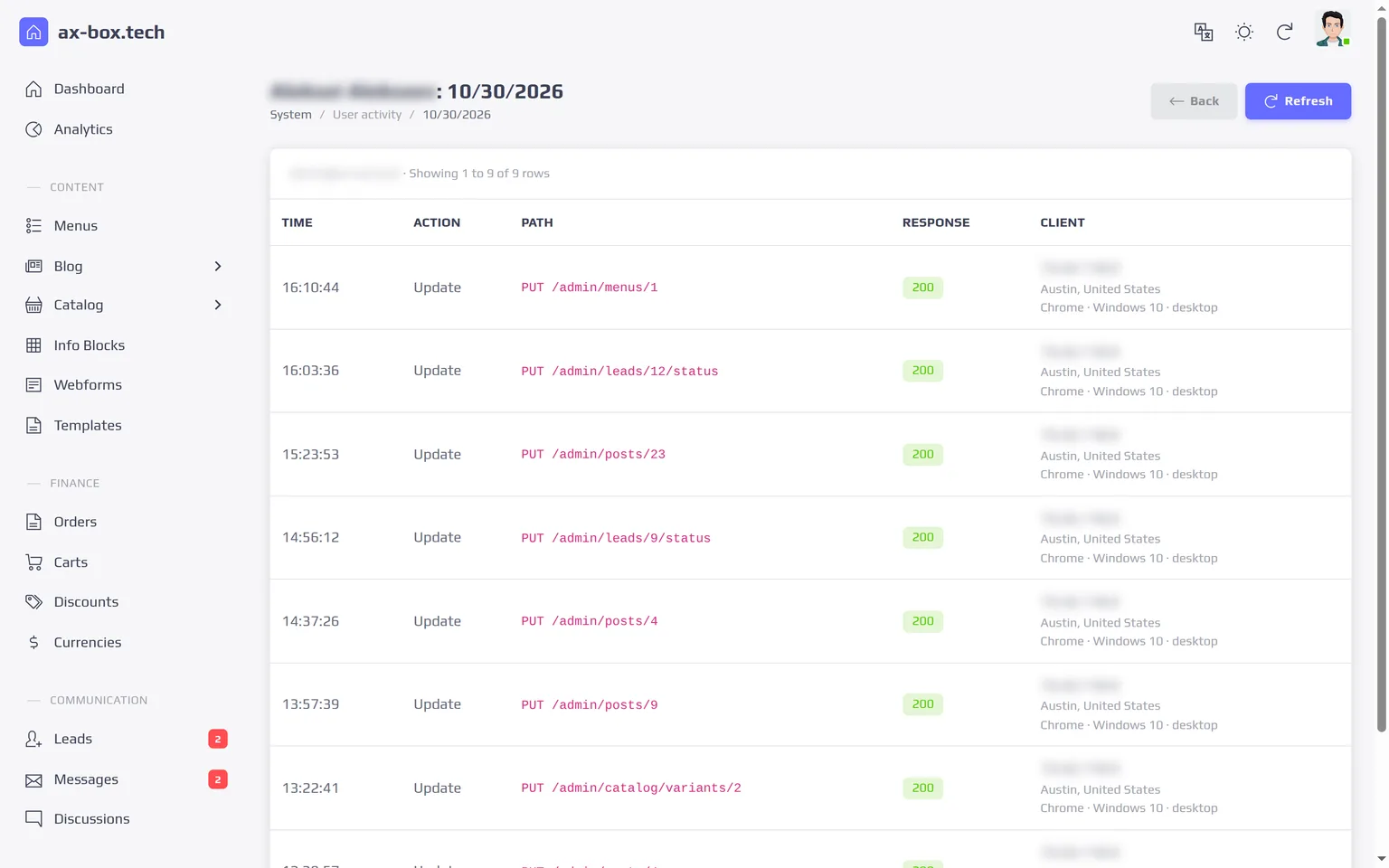
- a log of user actions in the admin panel;
- CSRF protection, rate limits on public endpoints and encrypted secrets;
- module-level backups and restores;
- database migrations run automatically on start, so updates do not need manual steps.
Part of AX-BOX Platform
AX-BOX CMS is built on AX-BOX Platform, the modular core we develop in Go: the admin panel, users and roles, templates, the event bus, caching, queues and the module system. Content management is the first product on it. AX-BOX Commerce adds a product catalog, a cart, checkout, orders and online payment on the same core; its catalog already runs in production on WoodHomes. Solutions for service businesses are in development. A site that starts on AX-BOX CMS can grow into them without changing the platform.
Limitations
What AX-BOX CMS does not do, so you can decide before a call:
- No product catalog or store. Products, filters, discounts, a cart and orders are in AX-BOX Commerce.
- No plugin marketplace. New features come as platform modules that we build; there is no catalog of third-party extensions to install.
- Themes are ours or yours. There is no store of ready-made themes: the site gets a theme built from your design, or your team adapts the templates.
- Templates need HTML. Editors work in a visual editor, but changing the look of the site takes someone who knows HTML.
- The edition is chosen before launch. Moving a working single-language site to Multilingual is a content migration, done as a project.
- Self-hosted only. There is no cloud subscription: the system runs on your server or cloud account, and our team can install it for you.
Frequently Asked Questions
- 1.Do we need a developer after launch?
Not for day-to-day work. Content is written in a visual editor; menus, forms, redirects, tracking codes, mailboxes and AI are managed in the admin panel; templates are edited by someone who knows HTML. When something is unclear, the user manual and its AI assistant help. A developer is needed for custom integrations, new modules and significant changes to the design or logic of the site, and our team can build them.
- 2.Can we use our own design?
Yes. A theme is a set of HTML templates, styles and scripts. We can build a theme from your design, or your team can adapt templates in the admin panel.
- 3.Where are the site and the data stored?
On your server or in your cloud account. AX-BOX CMS is self-hosted: the database, uploads and backups stay with you, and analytics work without a third-party counter.
- 4.How much does a license cost?
License prices are on request and depend on the edition and the number of production sites. Tell us about the project, and we will send a quote and arrange a demo.
- 5.Can we get the source code?
With a ready-made license, the core is delivered as a compiled build, and its source code is available under a separate Enterprise agreement. In a custom project we build on the core, you receive a perpetual non-exclusive license to the core together with its source code, and all code written for the project belongs to you after the final payment.