

AX-BOX Commerce is AX-BOX CMS with a product catalog and online sales. It has everything in AX-BOX CMS: the admin panel, templates and blocks, technical SEO, AI, forms, leads, mail and analytics, built on the same high-performance Go architecture. On top of that come a product catalog with filters, discounts and currencies, and a store: a cart, checkout with delivery and payment rules, orders with payment tracking, online payment and quotes for products sold at an agreed price. The store and the work around it stay in one admin panel on your own server.
- Built for: online stores, B2B sales with prices on request, manufacturers and showrooms that take orders on the site.
- Editions: Single-Language for one market and Multilingual for several languages and markets.
- Delivery: self-hosted on your server, a perpetual license per production site.
- Two modes: a catalog where visitors choose and send requests, or a full store with a cart and payment; a catalog can become a store later without changing the system.
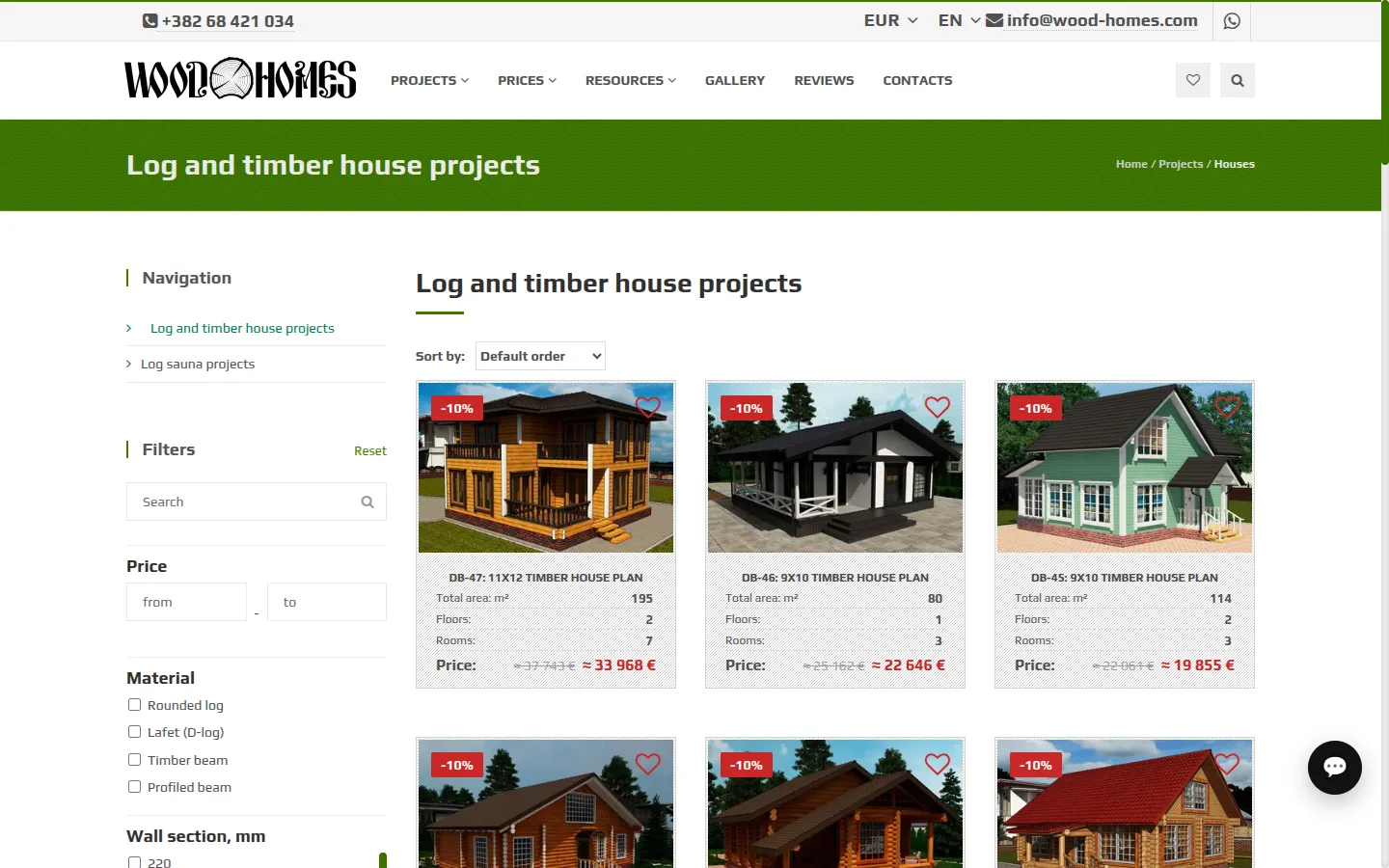
- In production: the WoodHomes catalog of 217 house projects runs in catalog mode in three languages and three currencies. The cart, checkout and online payment are new and are covered by automated tests; WoodHomes does not use them yet.
- Availability: on request; we set it up together with the launch of your store.
AX-BOX Commerce at a Glance
- Everything in AX-BOX CMS: content, forms, leads, mailboxes, analytics and AI in the same admin panel.
- Product catalog: variants, attributes, filters, search, prices on request, discounts, currencies and product reviews with ratings.
- Cart and checkout: anyone can fill a cart; ordering takes an account with a confirmed email, and delivery methods and payment terms are the ones you set up.
- Orders and money: statuses, history, payments and refunds in one card; stock is written off on order and returned on cancellation.
- Online payment: Stripe today, behind a provider layer that takes other payment services without changes to the store.
- Quotes: a manager prepares an offer with agreed prices, and the client accepts it and places the order through a link, without an account.
- Your server, your data: orders, customers and payments stay in your database.
Product Catalog
The catalog works on its own as a showroom or a price list, and it is the base of the store.
- Products and variants: a product groups its variants, such as colors and sizes; each variant has its own page, SKU, barcode, price, stock, photos, video and texts.
- Attributes: brand, material, size and any other property, grouped into attribute sets by product kind; required attributes are checked on save.
- Filters and search: visitors filter a category by attributes, price and availability with search-engine-friendly filter URLs, and search the catalog by name, SKU, barcode and attributes.
- Price on request: a variant can show "Price on request" with a request button instead of a price; the request arrives as a lead.
- Discounts: a percentage or a fixed amount on a product or a whole category, with start and end dates; the site shows the old price crossed out and a badge.
- Currencies: exchange rates load daily, and visitors can see prices in their currency.
- Reviews and favorites: signed-in visitors rate products with stars and photos, ratings go into the structured data for search results, and visitors save products to favorites without signing in.
Cart Without Surprises
The cart lives on the server, so the counter in the header, the product button and the cart page always show the same thing. Changing a quantity recalculates the total without reloading the page.
- a product cannot be added beyond its stock, and the cart says how many can be ordered;
- a guest cart moves into the account when the buyer signs in;
- prices in the cart are always current, with discounts applied and shown, and the order keeps the discounted price even if the discount is changed later;
- visitors see prices in their currency, while the cart, the order and the payment stay in the store currency;
- products with a price on request cannot be ordered directly: they are sold through a quote.
Checkout With Your Delivery and Payment Rules
Ordering from the cart takes an account with a confirmed email. Orders are tied to a verified email address, so the store has a reliable way to send updates, and the buyer finds the contacts already filled in. A visitor can fill the cart without an account: checkout offers to sign in or register, and the cart moves into the account. The buyer chooses how to receive the order and how to pay from the options you set up in the admin panel. A client buying at agreed prices does not need an account: that order goes through a quote.
Delivery Methods
- Pickup with the address of the pickup point;
- Delivery to an address with city, street and postal code;
- a cost per method, free or paid, and who pays for delivery: the store, as part of the total, or the carrier on receipt.
Payment Terms
- Full prepayment, a deposit of a set percentage, or payment on delivery;
- payment instructions shown to the buyer, such as bank details;
- a payment deadline: an order without its deposit in time is cancelled by itself and its stock goes back on sale.
Rules per Product
A product group or a single variant can limit which methods and terms the buyer may choose, for example pickup only for heavy goods or prepayment only for made-to-order items. If the cart holds products with no common option, checkout explains it and suggests separate orders.
No Order at a Price the Buyer Did Not See
Prices are not frozen in the cart. The order is placed only if the items, prices and options match what the buyer confirmed; otherwise checkout shows what changed. A double click or a second tab never creates a second order, and stock is written off exactly once.
Orders and Payment Tracking
Every order has a card in the admin panel: the buyer with contacts, delivery, payment terms, the items at the price they were ordered, and a history of every change with the name of the employee.
- Statuses: New, Processing, Completed and Cancelled. An order with a deposit is taken into work only after the deposit arrives and completed only when it is paid in full.
- Payments: money received outside the site, by transfer or in cash, is recorded in the card; refunds too. The card shows what is paid and what is still due.
- Buyer account: a signed-in buyer sees all their orders in the account, with statuses, items and payments; an order placed through a quote without an account moves into it on sign-in.
- Orders from quotes: a client who accepts a quote without signing in gets a private link to the order that opens on any device.
- Lists: orders, payments, quotes and carts with counters, filters and a period; a filtered list is a link you can send to a colleague. Carts show what was chosen but not bought.
- Emails: the buyer is emailed when the order is received, taken into work, completed or cancelled, and when a payment or a refund is recorded, in the language of the order and with a link to it; the first email spells out the deposit deadline. The manager is emailed about every new order and every online payment, with the buyer's contacts and a link to the order card.
Online Payment
The buyer pays on the order page and returns to the order with the payment recorded. Payment providers are connected in the admin panel; Stripe is supported today, and the provider layer is built so that other services plug in without changes to orders or checkout.
- several providers at once, each with its own button such as "Pay by card";
- API keys stored encrypted and never shown again;
- the payment is confirmed by the provider, not by the buyer's return: signed notifications and a check every minute for payments that are still waiting;
- a payment page that closes when the order's payment deadline passes or the amount due changes; Stripe keeps a page open for at least 31 minutes, so a late payment is still possible;
- money that arrives for an order that no longer accepts it, such as a cancelled one, is flagged for a refund, not lost;
- Stripe receives one line with the amount due and the buyer's email; the full order with items, delivery and contacts reaches the payment layer, so a provider that needs it for receipts can get it.
Quotes and Prices on Request
Not every sale has a fixed price. A product can show "Price on request" with a request button; the request arrives as a lead, and the manager answers with a quote.
- The manager creates a quote from the lead card: the client's contacts are filled in.
- Adds products with agreed prices, delivery and payment terms, a validity date and a note for the client.
- Sends the client a link. The client opens it without signing in, accepts and places the order at the agreed prices, or declines.
The quote shows its status in the admin panel: draft, sent, accepted with a link to the order, declined, cancelled or expired. All quotes of a client are one click away from the lead.
Search Visibility and Speed
- SEO: product and listing structured data with ratings, clean filter URLs, a sitemap and everything else from AX-BOX CMS.
| Page | 1 request at a time | 50 concurrent requests |
|---|---|---|
| Product page, 24 variants | 479 RPS, p99 3.5 ms | 3,100 RPS, p99 30 ms |
| Catalog section, page 1 | 291 RPS, p99 9.5 ms | 1,882 RPS, p99 48 ms |
Conditions are the same as on the AX-BOX CMS page: one application instance on a 24-thread workstation, a catalog of 30,000 products with 90,000 variants, no full-page cache. The product page carries full specifications, a gallery and a form. The weak spot we know about is a section with many filters checked at once: with twenty filters it drops to 868 RPS at 50 concurrent requests.
Single-Language or Multilingual
| Single-Language | Multilingual | |
|---|---|---|
| Catalog and pages | One site language | Every product, category and page in each language |
| Cart, checkout and orders | In the site language | In the buyer's language, with the order page in the language it was placed in |
| SEO | Per page | Per page and language, hreflang between versions |
| Best for | One market | Several languages and markets |
Limitations and What Is Coming
What the store does not do yet, so you can plan:
- One payment provider today: Stripe. Others are added as connectors to the same payment layer.
- No tax calculation yet. The buyer pays the price set in the catalog; tax lines on orders and receipts are planned.
- No ready integrations with delivery services, accounting or marketplaces: we build them as projects for a particular store.
- The same as in AX-BOX CMS: no plugin marketplace, themes built from your design, and the edition chosen before launch.
Deployment and License
- Deployment: one compiled application with PostgreSQL and Redis in Docker, on your server or cloud account, with built-in HTTPS.
- License: perpetual, per production site; updates and support by annual subscription.
- Payments: you sign the contract with the payment provider and connect it with your own keys; the money goes to your account.
- Services: store design, catalog migration, integrations and custom modules by our team; see Services.
Frequently Asked Questions
- 1.How is it different from AX-BOX CMS?
AX-BOX CMS runs content sites without a catalog. AX-BOX Commerce adds the product catalog and the purchase itself: the cart, checkout, orders, online payment and quotes. A site that starts on AX-BOX CMS can move to Commerce without changing the platform.
- 2.Which payment providers can we connect?
Stripe is supported today. Other providers are added as connectors to the same payment layer; tell us which one you need, and we will include it in the launch plan.
- 3.Can customers buy without an account?
Not from the cart: ordering takes an account with a confirmed email, so every order is tied to a verified address for updates. Visitors fill the cart without an account, and it moves into the account when they sign in or register at checkout. A client buying at agreed prices accepts a quote through a link without an account, leaves a name and an email or phone, and gets a private link to the order.
- 4.We sell at prices agreed with each client. Does it fit?
Yes. Mark products as "Price on request", answer requests with quotes, and the client places the order at the agreed prices through the quote link.
- 5.How much does a license cost?
License prices are on request and depend on the edition and the number of production sites. Tell us about your store, and we will send a quote and arrange a demo.